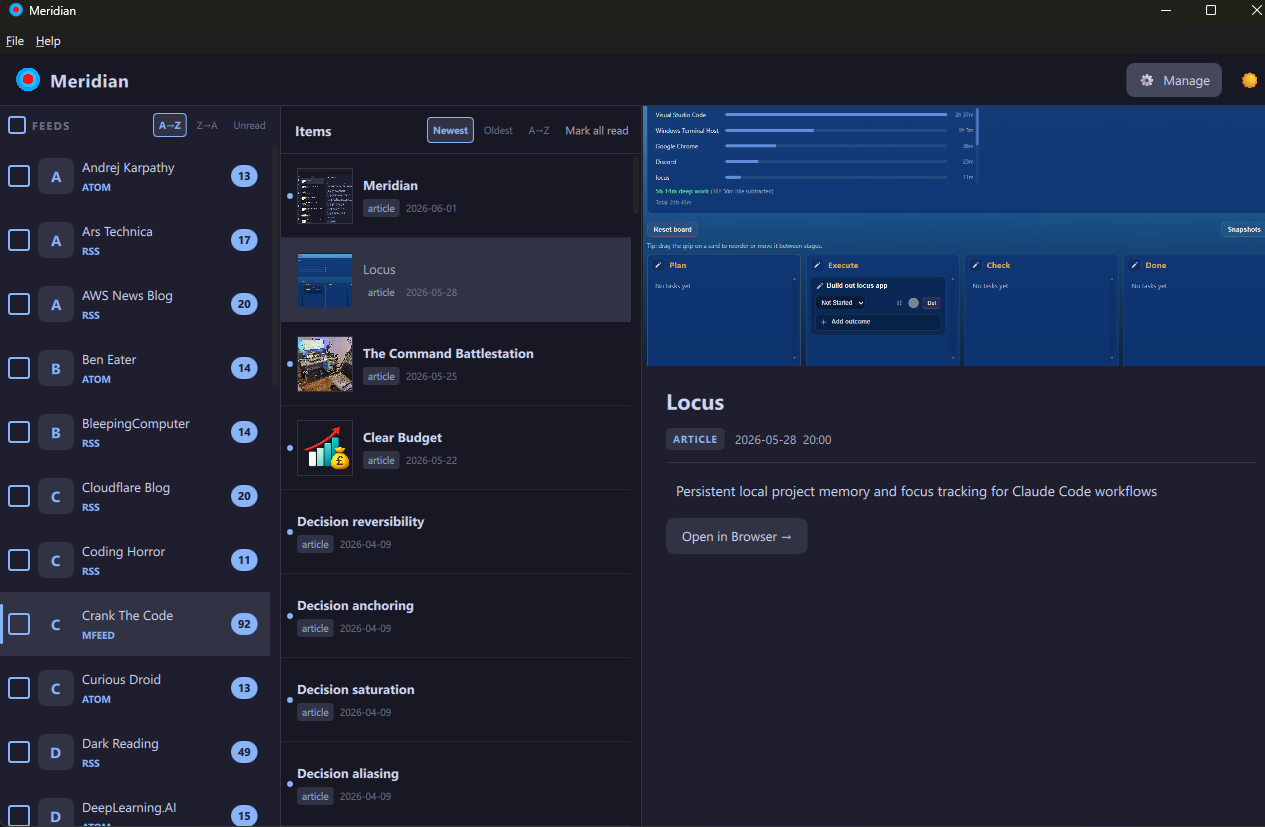
Meridian is the reference desktop client for the MMSP protocol and its MFEED JSON feed format - a modern, structured alternative to RSS.
Full support for RSS, Atom, podcast, and YouTube feeds included for backwards compatibility.
MMSP (MultiMedia Subscription Protocol) is a modern, open standard for feed subscription - structured, JSON-native, and designed for clarity where RSS/Atom have accumulated decades of cruft.
MFEED is the JSON feed format that implements it.
Meridian is the reference desktop client: it parses MFEED natively, enforces MMSP polling semantics (conditional GET, 300 s floor, MMSP/1.0 User-Agent), and applies MMSP Appendix A ABNF filter expressions per-feed. RSS, Atom, podcast, and YouTube support is included so you can subscribe to everything in one place while MFEED adoption grows.
MMSP-native from the ground up, with full compatibility for every major feed format you already use.
MFEED and MMSP native
Parses MFEED (MMSP JSON format) natively. Enforces MMSP/1.0 User-Agent, conditional GET (ETag / Last-Modified), and the 300 s poll floor per the spec. Read the spec →
Feed discovery
Search new feeds by topic via feedsearch.dev. 46 category autocomplete, result cap selector (10 to 200), and bulk subscribe with a confirmation dialog.
Filter expressions
Per-feed MMSP Appendix A ABNF filters. The filter dialog surfaces existing terms as toggleable rows - no syntax knowledge required for common cases.
Background polling
Conditional GET with ETag and Last-Modified. Rate-limit backoff, 300 s poll floor. Async asyncio scheduler - zero CPU when no feeds are due.
Catppuccin themes
Mocha (dark) and Latte (light) with a single toggle. Theme preference persists across restarts. Amber focus ring on every focusable control.
Full-text rendering
content:encoded preferred over description so full article HTML is shown where available. Media player for podcast and video items built in.
Full keyboard navigation
Every control reachable without a mouse. Tab wraps cleanly end-to-end. Enter, Space, Left, Right all wired. Escape closes drawers and dialogs.
Import and export
Full subscription round-trip via JSON. A curated feeds_export.json ships with the repo so you can bootstrap a reading list in seconds.
Bulk feed management
Select-all checkboxes, bulk remove, per-feed filter, edit, and delete from the subscription manager. In-place list removal preserves scroll position.
Single-device by design
No account, no cloud, no server. Your subscriptions and read state stay on your machine. JSON export/import moves them between machines - the migration path, not live sync.
Architecture
A reference client, built like one
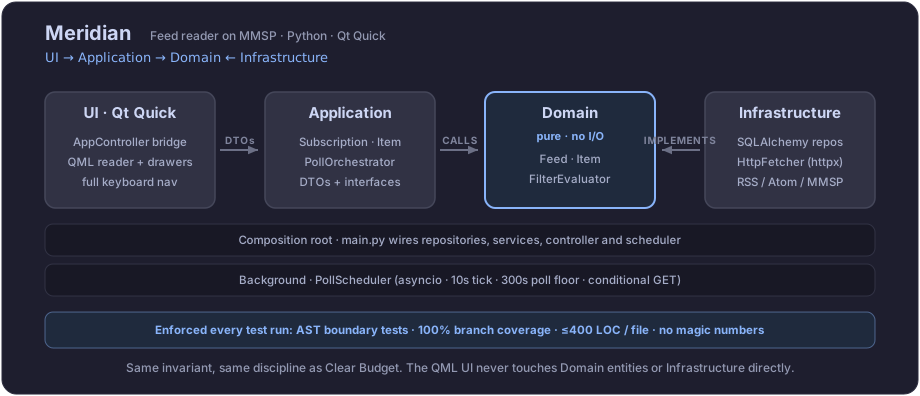
A reference client has to be exemplary or the spec it implements loses authority. So MMSP polling semantics sit behind a pure domain, inside a four-layer architecture, UI to Application to Domain with Infrastructure implementing inward. AST tests and 100% branch coverage run on every build, so the behaviour the spec mandates is behaviour the code cannot structurally violate.
Changelog
What's new
Recent releases have focused on keyboard navigation completeness, theme persistence, and feed discovery from the app itself.
v2.3.0 - 2026-06-03
Cross-Platform Release + Diagnostics
macOS DMG build - tested on Tahoe
Linux Flatpak - tested on Ubuntu
Windows installer rebuilt and re-tested on Windows 11
Crash diagnostics: stdout/stderr redirected to ~/Library/Logs/Meridian/meridian.log in frozen mode
About dialog icon and Licence dialog text rendering fixed
Bulk subscribe confirmation dialog height corrected - previously showed only one URL
v2.2.0 - 2026-06-03
UI/UX Overhaul + Keyboard Navigation
Full UI/UX layout overhaul: buttons replace menus throughout
Complete Tab/Shift+Tab and arrow key navigation across all controls
Dark/light theme preference persists across restarts via Qt.labs.settings
Escape closes the Feed Discovery panel from any control
371 tests, 100% branch coverage
v2.1.0 - 2026-06-02
Full Keyboard Navigation
Every interactive element reachable and operable without a mouse
Tab chain: File menu → Search → Manage → Theme toggle → Feed list → Item list → Open in Browser → wraps
Amber focus ring on all focusable controls
Full keyboard nav inside Manage Subscriptions and all its dialogs
Filter dialog opens pre-populated with existing terms as tabbable toggleable rows
Left/Right cursor navigates between dialog footer buttons (Cancel / OK)
v2.0.0 - 2026-06-02
Feed Discovery
Search by topic or keyword - subscribe to one or many feeds without leaving the app
Discovery panel runs on an isolated async event loop in a daemon thread
DiscoveryFetcher ABC with FeedsearchFetcher implementation - same layered boundaries as the rest of the system
Pre-built installers for Windows, macOS, and Linux on the Releases page. Or run from source in three commands.
Download the latest installer for your platform from the GitHub Releases page - no Python required. Windows ships as MeridianSetup.exe, macOS as a DMG, Linux as a Flatpak. All built with PyInstaller and ship everything bundled.